How I Built a Bilingual Portfolio for a Photojournalist Without Turning Every New Page Into a Dev Task
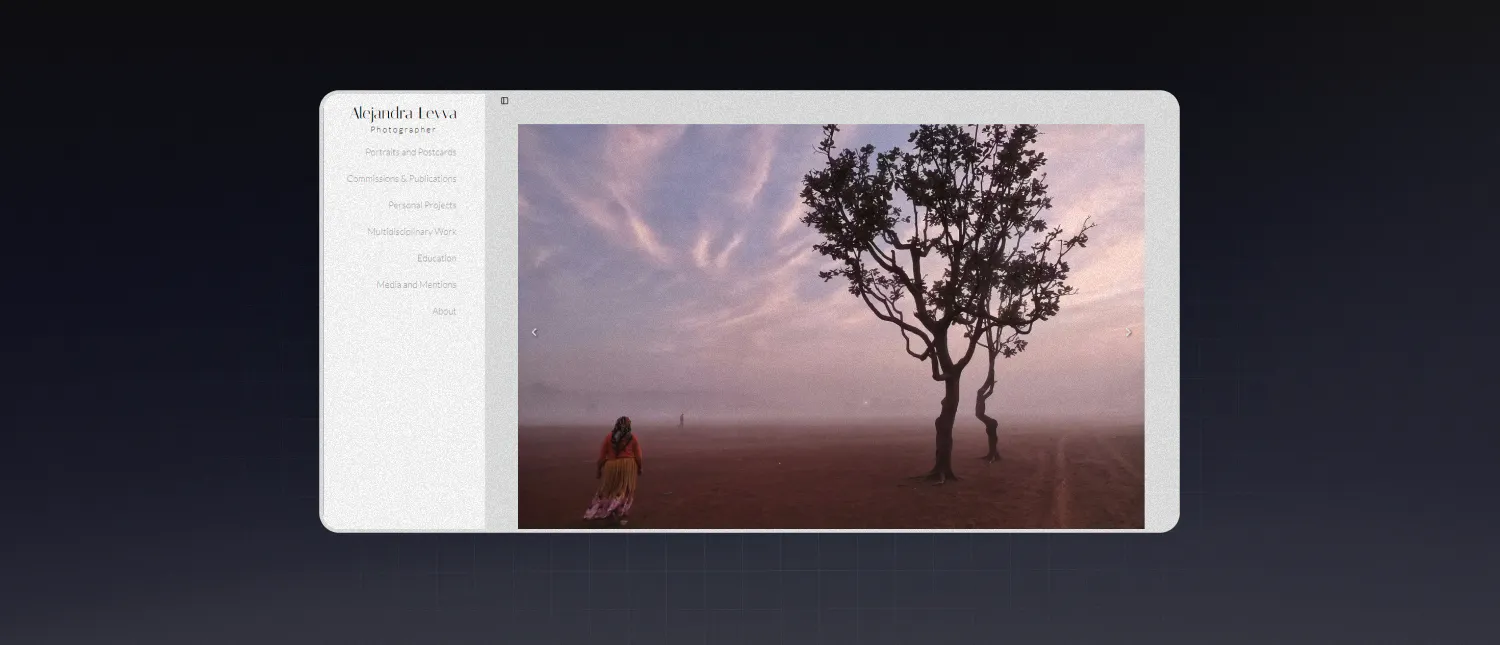
Alejandra Leyva needed a portfolio that could do two things well: present photography with enough visual restraint to let the work speak, and let new stories go live without needing a developer every time.
That sounds straightforward until you add bilingual content, dynamic project pages, contact protection, and image-heavy layouts that still need to behave on mobile.
The Problem: A Portfolio Should Not Be a Bottleneck
For a journalist and photojournalist, the site is not a static brochure. It is an active archive of published work, ongoing projects, and professional identity.
That meant the project could not rely on hard-coded pages or a content model that only made sense to a developer. The client needed to create and update work independently on the fly, switch between English and Spanish, and keep the presentation polished across devices.
The job was not just to build a website. The job was to build a publishing system that still felt like a portfolio.
Why I Chose Next.js and Prismic
I built the site with Next.js, Tailwind CSS, and Prismic.
That stack made sense for the shape of the problem:
- Next.js handled routing, rendering, and performance well for a content-driven site.
- Prismic gave the client a manageable way to create and organize content without touching code.
- Tailwind CSS made it easier to build a responsive layout system around photography, where spacing and image behavior matter more than decorative UI.
The important architectural decision was to treat the site as a headless CMS application, not a collection of fixed pages.
Content lives in Prismic. The frontend reads those documents, maps them into components, and renders pages dynamically. That keeps presentation and content management separate, which is exactly what this kind of client workflow needs.
How the Site Handles New Projects Without New Routes
One of the core requirements was that new portfolio pages should not require a code deploy or manual route creation.
So instead of building a page per project, I used dynamic routing driven by Prismic document UIDs. In practice, that means the client creates content in the CMS, and the frontend resolves it through a shared page template.
The result is a structure where:
- page content is managed in Prismic
- page rendering is handled by reusable React components
- routes are generated from content, not manually maintained
That gave the site room to grow without turning every new case study into engineering work.
Building Bilingual Content Without Making Routing Weird
Supporting both English and Spanish was not just a matter of translating strings.
The harder problem was making language selection behave consistently across browser settings, navigation, reloads, and CMS content. If that logic gets sloppy, bilingual sites start feeling broken fast.
I solved that by introducing a language provider that coordinates three things:
- the user's browser language
- session storage
- route-level behavior inside the app
This kept language selection stable while still allowing the interface to respond to user preference.
export const LanguageProvider = ({ children }: { children: ReactNode }) => {
	const [lang, setLangState] = useState("es-mx");
	const router = useRouter();
	const pathname = usePathname();

	useEffect(() => {
		if (typeof window !== "undefined") {
			const savedLang = sessionStorage.getItem("lang");

			if (savedLang) {
				setLangState(savedLang);
			} else {
				const browserLang = navigator.language;
				const normalizedLang =
					browserLang.toLowerCase() === "en-us" ? "en-us" : "es-mx";

				setLangState(normalizedLang);
				sessionStorage.setItem("lang", normalizedLang);
			}
		}
	}, []);
};
There are cleaner-looking solutions on paper, but this approach matched the actual behavior the site needed.
Contact Forms Are Useful. Public Email Addresses Are Also Spam Magnets
The portfolio needed a contact flow, but publishing a plain email address on a public site is an invitation to scraper bots.
I handled that in two layers.
First, the form submits through a server-side API route using Nodemailer, which sends the message to the client's inbox without exposing mail credentials in the frontend.
const mailOptions = {
	from: email,
	to: process.env.EMAIL_TO,
	subject: `Nuevo mensaje de ${name}`,
	text: `Message from ${name} (${email}):\n\n${message}`,
};

try {
	await transporter.sendMail(mailOptions);
	return new Response(JSON.stringify({ success: true }), { status: 200 });
} catch (error: unknown) {
	if (error instanceof Error) {
		return new Response(
			JSON.stringify({ success: false, error: error.message }),
			{ status: 500 }
		);
	}

	return new Response(
		JSON.stringify({ success: false, error: "An unknown error occurred." }),
		{ status: 500 }
	);
}
Second, for direct email interaction on the frontend, I obfuscated the address and only decoded it when the user clicked.
const obfuscateEmail = (email: string): string => {
	return btoa(email);
};

const deobfuscateEmail = (encodedEmail: string): string => {
	return atob(encodedEmail);
};

const Contact = ({ slice }: ContactProps): JSX.Element => {
	const encryptedEmail = obfuscateEmail(slice.primary.email || "");

	const handleEmailClick = () => {
		const email = deobfuscateEmail(encryptedEmail);
		window.location.href = `mailto:${email}`;
	};
};
No, Base64 is not real security. That is not the point. The point is reducing low-effort scraping while keeping the interaction simple for real users.
Designing for Photography Means Designing for Restraint
A photography portfolio can fall apart when the layout tries too hard.
I used a mobile-first responsive system with Flexbox and Grid in Tailwind, keeping the emphasis on image presentation, spacing, and readable typography rather than decorative components. The site also uses yet-another-react-lightbox so galleries can display high-quality images without forcing awkward navigation patterns.
That mattered because photography-heavy pages have different failure modes than typical marketing sites. If images crop badly, spacing collapses, or the gallery experience feels clumsy, the work itself looks worse.
The Main Trade-Offs
This setup solved the client's workflow problem, but it came with trade-offs.
Using a headless CMS adds flexibility, but it also means language behavior, content modeling, and rendering logic need tighter coordination. You get editorial freedom, but you pay for it in architectural discipline.
The email obfuscation approach is another example. It is not meant to stop a determined attacker. It is meant to reduce casual scraping without adding friction for the client or the audience.
Those were acceptable trade-offs for this project because the priorities were autonomy, maintainability, and a clean presentation layer.
What I Learned From the Build
Three things stood out during this project.
First, bilingual support gets complicated as soon as content, routing, and browser preferences all need to agree. That logic deserves explicit handling early, not patchwork fixes later.
Second, content-managed portfolios are much better long-term when the route structure is designed around reusable templates instead of one-off pages.
Third, image-heavy sites benefit from technical restraint. The frontend should support the work, not compete with it.
What I Would Improve Next
The next round of improvements would focus on performance around galleries and image-heavy views.
Image preloading, smarter caching, and tighter optimization for large media sets would improve perceived speed, especially on slower connections and mobile devices.
Final Result
The finished site gives Alejandra a portfolio that is visually focused, bilingual, responsive, and easier to maintain without developer intervention.
That was the real goal from the start. Not just shipping a nice-looking site, but removing the friction between publishing work and presenting it well. Project: Alejandra Leyva Journalist Portfolio.
Type: Client.
Repository: https://github.com/toonchavez8/alejandra-leyva-portfolio
Live Site: https://alejandra-leyva.com/